|
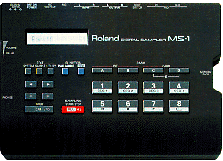
good (but basic) machine, good sound (better than su10)
downmload the "new" os here (haven't try to load it yet thought...):
ftp://ftp.roland.co.jp/pub/roland/worldwide/PCSAMP/
I heard threr are additional infos about this machine here http://www.synthman.com/roland/support/supplementalnotes/index.html but i can't access it, so if someone can tell me... :)
the instructions:
**Loading a New Operating System through MIDI**
The MIDI file, O_S112s.MID included with this text file has the System of the MS-1 that can be loaded from a MIDI sequencer that can play Standard MIDI Files. We recommend that you upgrade your MS-1 with this system disk even if your MS-1 reads the newer Sundisk Flash RAM cards since this newer system fixes some problems with MS-1 operations that were on earlier systems.
1. Connect the MIDI out of the sequencer to the MIDI in of the MS-1. 2. Load the O_S103.MID MIDI file into the sequencer. 3. Turn the MS-1 off and turn it back on again while pressing the 4 and 5 buttons. This will take you to the "Boot Mode". 4. Play the MIDI file on the sequencer. You should see "Receiving...." displayed on the MS-1 screen display. When the file is completely loaded the MS-1 display will read "Completed" and return to the Bank A screen. If you upgrade your system, the sounds that were in the A and B banks will be lost, so we recommend that you back them up either to a PCMCIA card or bulk dump them through MIDI. The steps for creating a bulk dump backup of the Internal banks sounds is on page 23 of the manual.
**Restoring the MS-1 Factory Demo from this disk** We also included the factory demo on this disk if you should want to reload it. To load in the original demo: 1. Connect the MIDI out of the sequencer to the MIDI in of the MS-1. 2. Load the first MIDI file 1_DEMO.MID into the sequencer. 3. On the MS-1 press the Pad mode button and then press the Utility button and scroll to the Bulk Receive function with the cursor arrow buttons. 4. Play the MIDI file on the sequencer. You should see "Receiving...." displayed on the MS-1 screen display. 5. After the first file has loaded, the MS-1 display will show "Waiting next..." 6. Load the next MIDI file 2_DEMO.MID and play the sequence on your sequencer. 7. Repeat steps 4 through 6 to load in the MIDI files, 3_DEMO.MID 6_DEMO.MID until you finish loading in the last MIDI file MS1ORG1G.MID. The MS-1 display will read "Completed" and return to the Bank A screen. The original demo should now play from the Sequencer mode.
Also, you can see your ms1's os version by pressing pad1 + pad8 when turning it on
And you can initialise it by pressing pad1 + pad8 while turning on & then on pad8 & then on rec/yes. (will erase all datas!!)
I'm still looking for a (.pdf if pssbl :p) m a n u a l for it or every info available. Plzzzzzz...
|